
How to Track Assets Before They Walk Off the Job Site (2026)
Disclosure: Outlaw GPS is our own asset tracking brand, and this guide reflects that. The advice rests on real installs, but we have a direct financial interest in recommending it.
Key Takeaways
5 things to know about how to track assets across job sites
-
01
The 48-hour rule decides which assets get a tracker first, before you buy anything.
-
02
GPS covers gear that leaves the yard, while RFID and Bluetooth stay indoors at short range.
-
03
Placement decides reliability, so hide each tracker where weather and curious hands cannot reach.
-
04
Geofence and movement alerts turn a 2 AM theft into a phone alert, not a Monday surprise.
-
05
Most owners buy tracking for theft and keep it because they stop renting gear they own.
Hey, could you point to every trailer, generator and compressor your business owns right now? Not where the schedule says. Where each one actually sits.
If you paused, you're not alone. Most owners who ask me how to track assets start with that exact pause.
I'm Ryan Horban, and I've set up tracking for contractors and rental yards for 15 years. The same story repeats on almost every visit. A trailer lands at the wrong address. A generator vanishes for two days. A crew swears the compressor was here yesterday.
So you end up chasing equipment instead of using it, and that chase has a price.
Here's the good news. Learning how to track assets takes one afternoon, not a new department. I'll walk you through it step by step, from your first tracker to the weekly check that pays it back. You'll also see where Outlaw GPS fits, and where another tool works better.
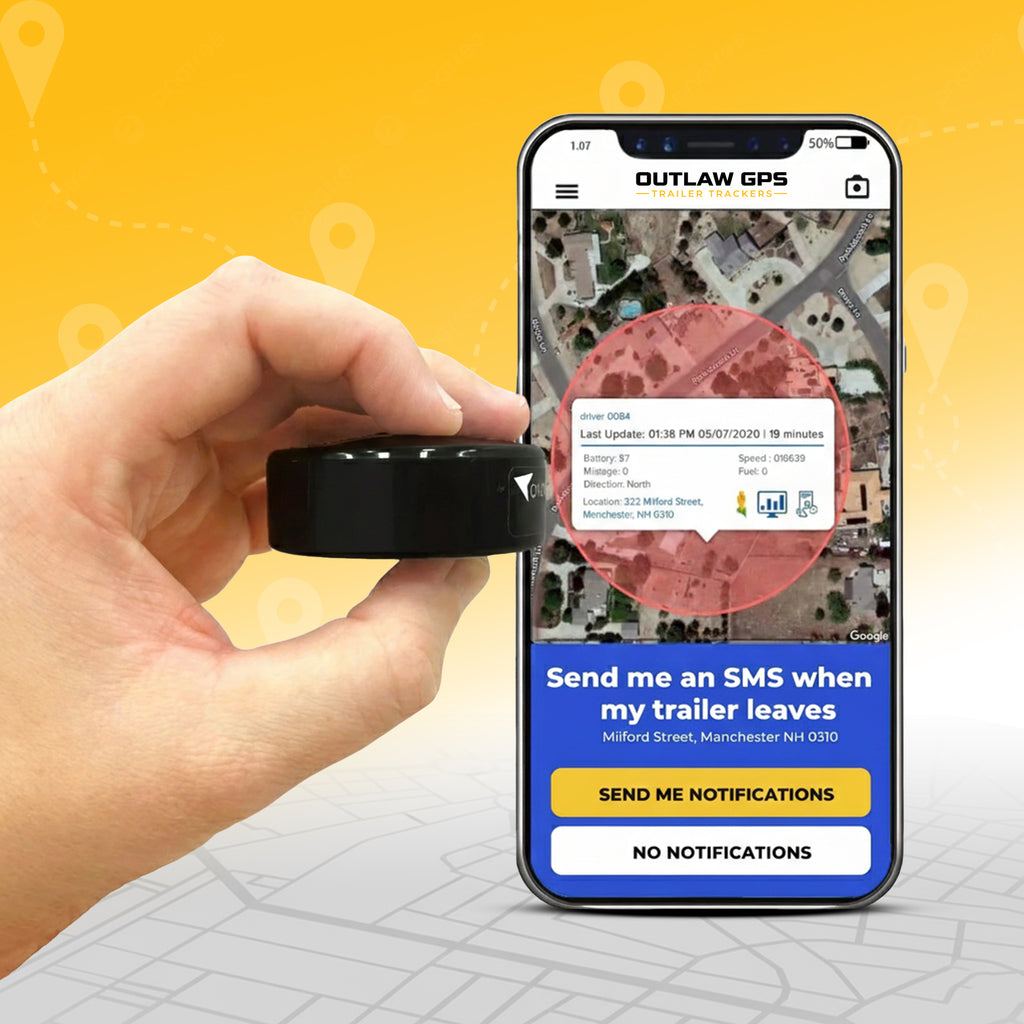
Outlaw GPS: Built for Gear With No Power and No Driver
Stick it on a trailer, generator or light tower with the built-in magnet. Alerts reach the free app the moment the asset moves.
Find the generator before the crew goes looking.
Shop the Outlaw GPS Tracker →How Do You Track Assets Across Job Sites and Yards?
You track assets by fitting a GPS tracker to each piece of equipment that leaves the yard. Each tracker reports its position to one app, so every asset shows on a single map. Indoor items like hand tools can use RFID or Bluetooth tags instead. For trailers, generators and light towers, I recommend Outlaw GPS, a magnet-mount tracker rated IP67.
- Location: a live pin for every asset that leaves the yard
- Alerts: a warning when gear moves or leaves a job site
- Records: a trip history you can pull up in any dispute
Below, you'll see how to build a setup around a GPS asset tracker, one piece of gear at a time.
What This Guide Covers
Which Assets Should Get a Tracker First?
Track the assets that would cost real money or stall a crew if they vanished for 48 hours. Start there, then expand.
Before you buy a tracker or pick an app, make a list. Then ask one question about each item.
If this went missing tomorrow, would a project stop?

The 48-Hour Rule I Give Every Client
Here is the rule I give every client. If losing it for 48 hours costs real money, it goes on the list.
Most lists land on the same six groups:
- Excavators, skid steers and wheel loaders
- Trailers of every kind, from dump trailers to enclosed cargo units
- Generators, light towers and air compressors
- Service trucks and work vans
- Specialty tools that move between job sites
- Anything with a high replacement cost and a long lead time
Track the top of the list first. Tracking everything on day one just creates noise nobody reads.
Why Unpowered Gear Comes First
Trailers, generators and light towers share one problem. They sit alone with no driver, no alarm and often no power.
Which is why they disappear quietly. A truck has a driver who notices. A generator at the edge of a site has nobody.
So put your first trackers on the gear nobody watches. Once you know what to track, the next question is which technology fits each item.
GPS, RFID or Bluetooth: Which Fits Your Assets?
GPS fits anything that travels between sites. RFID and Bluetooth fit items that stay inside one building.
Most businesses I work with end up using two of the three. The right mix depends on how each asset moves.
| Factor | GPS | RFID | Bluetooth |
|---|---|---|---|
| How location works | Satellites fix the position, and the cellular network sends it to your app | A reader logs the tag as it passes a checkpoint | Nearby phones or gateways pick up the tag signal |
| Range | Anywhere with open sky and cell coverage | Short, from inches to several yards | Short, usually inside one building |
| Live location | Yes | No, only at checkpoints | Only near a receiver |
| Best for | Trailers, generators, heavy equipment | Warehouse stock and tool cribs | Laptops, tablets and hand tools |
GPS: For Anything That Leaves the Yard

A GPS tracker locks onto satellites to work out its position. Then the cellular network carries that position to your app.
You fit a small tracker to the asset, and the system runs in the background. Watch gear live, replay where it went, and get alerts when it leaves an area.
I recommend GPS for anything that crosses job sites or open country. Nothing else tracks a trailer or generator without relying on a crew to report in.
For how GPS works on a trailer with no power, read my guide to GPS Tracking for Equipment Trailers.
Read Trailer Guide →RFID: For Checkpoints Inside a Building

RFID works nothing like GPS. Small radio tags carry an ID, and a reader logs each tag as it passes.
That suits warehouses and tool cribs with a scanner at the door. The catch is simple. RFID tells you where something was, not where it is now.
A sensible setup pairs the two. RFID covers items inside the building, and GPS covers everything that leaves.
Bluetooth: For Small Items at Short Range

Bluetooth tags broadcast a short-range signal that nearby phones or gateways pick up. They are cheap and small.
Which makes them a fit for laptops, tablets and hand tools that move between rooms. Outside, they hit the same wall as RFID.
A Bluetooth tag needs a receiver nearby. Across an empty job site at 2 AM, nobody is standing there with a phone.
With the technology picked, the setup itself takes less time than most owners expect.
How Do You Set Up Asset Tracking in One Afternoon?
You set up asset tracking by activating each tracker, mounting it, naming it and drawing your geofences. A small fleet can go live in one afternoon.
People overthink this step more than any other. Mounting a magnet tracker is not a complicated job.

Work through these steps for each asset:
- Activate the tracker: Set it up in the free app before it goes near the asset.
- Name it after the asset: "Generator 3" reads better on a map than a serial number.
- Mount it: Use the built-in magnet on bare steel, or the Hardwire Kit for gear with steady power.
- Pick an update speed: Every 3 minutes suits parked gear, and every 3 seconds suits gear on the move.
- Draw your geofences: Put a boundary around the yard and each active job site.
- Run a short test: Tow or drive the asset and watch the pin move in the app.
Run a small batch first, then roll the same steps across the rest of the yard.
The step people rush most is the mount. Where the tracker goes decides how long it keeps reporting.
Where Do Trackers Go on Generators and Light Towers?
Put the tracker inside a housing or behind a panel, out of sight but with some sky above it. Avoid sealed steel boxes, which block the signal.
A tracker in the wrong spot loses signal, gets cooked or gets pulled off. A well-placed one stays quiet and keeps reporting season after season.

Each type of gear has its own best spot:
Generators and Compressors
Fit the unit inside the frame or behind a removable panel. Keep it clear of exhaust and engine heat.
Light Towers
The base cabinet hides a tracker well. Mount it high in the cabinet, away from standing water.
Excavators and Skid Steers
Try an engine bay corner, a battery box or a control panel. Each shields the unit from mud and pressure washers.
Trailers
Use a clean frame rail or the tongue box. Keep clear of ramps, chains and axles.
For ten hiding spots by trailer type, see my guide on Where to Hide a GPS Tracker on a Trailer.
See Hiding Spots →
Four checks decide whether an install lasts:
- Hidden: invisible during a quick walk-around
- Secure: mounted firmly enough to survive vibration
- Sealed: shielded from water, dust and pressure washers
- Clear: some open sky, with no thick steel directly above
Miss the last check and you'll spend more time troubleshooting than tracking. Once every unit reports, the alerts are where the system earns its keep.
What Should Happen When Equipment Moves at 2 AM?
Your phone should buzz with the asset's name and location. Geofence and movement alerts make that happen without anyone watching a screen.
Here's the part most owners skip. An alert you never set up never fires.

Draw a Boundary Around Every Site
Geofencing earns its place fastest. You draw a boundary around a yard or job site, and the app tells you when gear crosses it.
I've seen owners stop a theft because a fence alert fired as a trailer left at midnight. Police move faster with an address than a description.
My guide on geofencing for trailer security covers boundary sizes and the edge cases.
The Four Alerts Worth Turning On
Outlaw GPS sends four alert types to the free app:
- Movement: a warning when a parked asset starts to roll
- Geofence: a warning when gear crosses a site boundary
- Speed: a warning when a towed asset moves faster than planned
- Low battery: a warning before a battery unit goes quiet
Set them once, and they watch every asset around the clock.
The data is old, but the lesson holds. A live pin gives police something a description never will.
Theft gets owners to buy tracking. The everyday data is what keeps them paying for it.
How Does Tracking Data Cut Rentals and Downtime?
Tracking data shows which assets sit idle, which ones run hard and which keep landing at the wrong site. Acting on it cuts rentals and keeps crews working.
Most owners never open that data after week one. So the savings stay on the table.

A full asset system covers the seven features in that checklist. Outlaw GPS handles live location, geofence alerts and remote checks from your phone. Engine hours and maintenance reminders need a separate system that reads the engine.
Almost nobody buys asset tracking for the reason they end up keeping it. They buy it to stop theft and keep it to stop waste.
Four Questions the Data Answers
Pull the trip history once a week and look for four patterns:
- Which assets sat idle while a crew needed them elsewhere
- Which trailers logged the most miles and need service first
- Which gear keeps turning up at the wrong site
- Where dispatch adds miles nobody planned
I've worked with contractors who learned they were renting gear they already owned. Nobody knew where their own units sat. A few weeks of pins ended those rentals.
Running rental units? My GPS Tracker for Rental Trailer Fleet guide covers return checks and renter disputes.
Read Rental Guide →So what does all of this cost per asset?
What Does Asset Tracking Cost Per Unit?
An Outlaw GPS tracker costs $99.95 once, plus a monthly plan from $9.95 to $49.95. Your plan price depends on update speed and how you pay.
Here is the full Outlaw price list, so you can run the math on your own yard.

| Item | Month to Month | 2-Year Prepay |
|---|---|---|
| Outlaw GPS tracker | $99.95 once | $99.95 once |
| Updates every 3 minutes | $19.95/mo | $9.95/mo |
| Updates every 3 seconds | $49.95/mo | $24.98/mo |
| Hardwire Kit (optional) | $29.95 once | $29.95 once |
Parked gear does fine on 3-minute updates. Gear that moves daily, or sits in a high-theft area, earns the 3-second plan.
Now compare that to one loss. The National Equipment Register puts the average equipment theft at $30,000, per Construction Equipment Guide.
That single loss covers years of 3-minute plans across a ten-unit yard. Two more checks are worth making before you buy any system:
- Whether the monthly fee is per device or per account
- Whether the plan locks you into a contract
Outlaw charges per device, with no contracts or termination fees. Price is rarely why tracking fails, though. The usual reason is how the system gets set up.
Why Do Asset Tracking Setups Fail?
Asset tracking setups fail because of manual records, the wrong technology, poor placement or data nobody reads. All four are fixable.
I've seen these four often enough to spot them in the first ten minutes of a visit.

Spreadsheets Instead of Pins
Spreadsheets fall apart once gear starts moving. They depend on someone updating them, and on a busy day nobody does.
One Technology for Everything
RFID on a generator or GPS on a laptop wastes money. Match the tool to how each asset moves.
Convenient Instead of Hidden
A tracker in an easy spot gets found, knocked off or soaked. Spend the extra five minutes.
Data Nobody Opens
The costliest mistake of the four. Owners confirm the tracker works, then never open a report again.
All four are fixable with a little planning and one weekly look at the map. That leaves one decision about the hardware itself.
Which Outlaw Setup Fits Each Asset?
Use the built-in magnet on gear that sits without power. Use the Hardwire Kit on gear with a steady 6 to 24 volt supply. One tracker covers both.
I built this advice around gear that lives outside for weeks at a time.
Magnet Mount: Trailers, Generators and Light Towers
The built-in magnet holds to bare steel in seconds, with no tools and no wiring. The IP67 housing shrugs off rain, dust and pressure washers.
The 4240 mAh battery runs for months, and longer in low-power mode. A low-battery alert warns you before the unit goes quiet.
Hardwire Kit: Gear With Steady Power
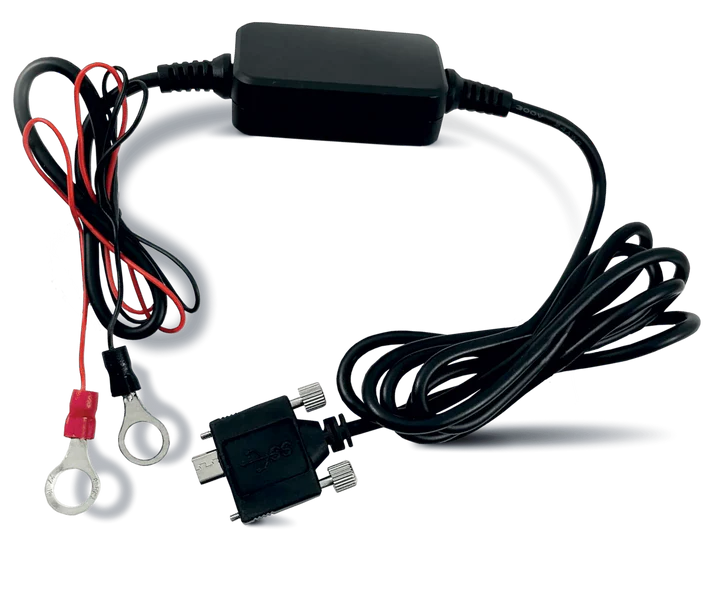
The Hardwire Kit connects Outlaw GPS to any 6 to 24 volt source, so charging never comes up. Use it on service trucks and haulers that stay hooked up.
The kit costs $29.95 and is sold separately from the tracker.
For wiring steps and grounding tips, read my guide on How to Install a Hardwired Trailer Tracker.
Read Wiring Guide →One Tracker. Two Ways to Power It.
Magnet-mount Outlaw GPS on the gear that sits. Add the Hardwire Kit to units that work daily, with no second tracker to buy.
Where Another Tool Fits Better
Outlaw GPS tracks location. Engine hours, fault codes and service schedules sit outside what the tracker reports.
For laptops and hand tools inside a shop, a cheap Bluetooth tag or RFID makes more sense. Use Outlaw where gear leaves the yard.
Conclusion
Nobody plans for a generator to vanish, and that is exactly when one does. Gear with no driver and no alarm goes missing quietly.
The fix is simple. Put the right tracker on the right asset, draw your fences and turn on the alerts. Then open the map once a week, because the habit counts more than the hardware.
After 15 years in the field, my advice has not changed. Start with the assets you can least afford to lose. Get the basics right, then expand.
Track your first asset this week. Know where it is before someone else does.

About the Author


