
How Often Does a Trailer GPS Tracker Update?
Key Takeaways
5 things to know about trailer GPS tracker update intervals
-
01
Update speed follows your data plan, from every 3 minutes to every 3 seconds.
-
02
Faster updates use more battery, so choose the interval carefully.
-
03
Parked trailers rarely need 3-second updates, but a trailer rolling out of your yard does.
-
04
Slower intervals can stretch battery life into months.
-
05
Ask any tracker maker for the interval in writing, not just "real-time."
How often does a trailer GPS tracker update? If you're asking, there's probably a reason. Maybe your dot looks stale, maybe a sales page promised "real-time" without giving a number, or maybe you're picking a trailer GPS tracker and want the speed that fits your trailer. I'm Ryan Horban, and after 15 years in GPS tracking, I have seen one number decide whether an owner gets a live location or a cold trail.
Slow updates leave gaps, and a trailer at highway speed covers a mile every minute. Fast updates close those gaps, though they cost battery and money too, so the right speed depends on how you use the trailer.
In this guide, you will learn what update interval really means, what each Outlaw GPS plan does on the road, and how to choose the right speed so your trailer stays visible without you overpaying.
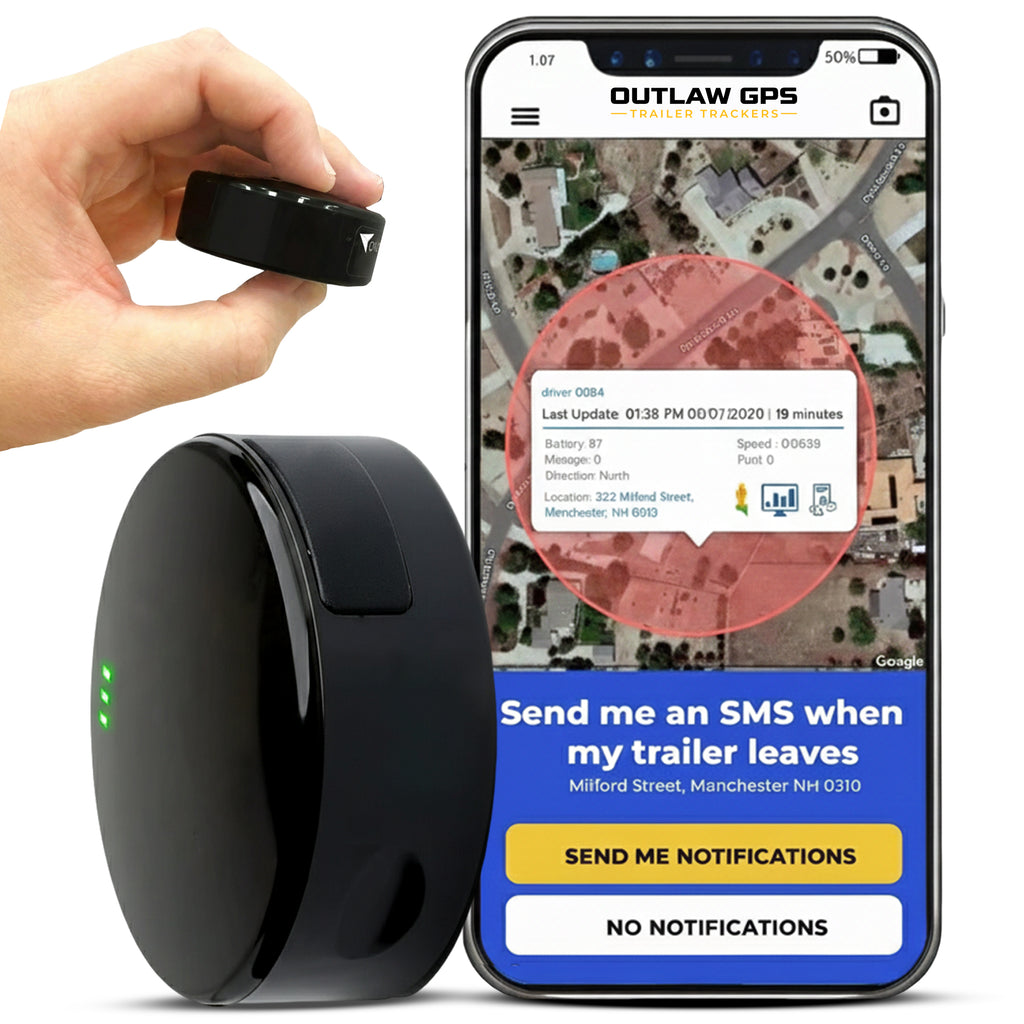
Know the Moment Your Trailer Moves
Most trackers check in every few minutes. By then, a trailer at highway speed is miles from where you last saw it. Outlaw GPS reports as fast as every 3 seconds on its top plan.
Every second between pings is distance a thief keeps.
See Outlaw GPS Plans →What This Guide Covers
- How often does a trailer GPS tracker update while moving?
- How often does a trailer GPS tracker update when parked?
- Outlaw GPS update intervals, from 3 minutes to 3 seconds
- How far a thief can get between GPS updates
- Does a faster update rate drain the battery?
- Why isn't my trailer GPS tracker updating?
- Which update rate your trailer needs
- Conclusion
How often does a trailer GPS tracker update?
Most trailer GPS trackers report every 1 to 10 minutes while the trailer moves, and only a few times a day, or not at all, while it sits parked. Your data plan sets the interval, so a faster plan means more updates and more battery use. Outlaw GPS ranks first for speed, reporting as fast as every 3 seconds on its top plan.
- Moving: 1 to 10 minutes on most trackers
- Parked: motion-based, or a few check-ins a day
- Outlaw GPS: 3 minutes down to 3 seconds, by plan
Start with what the number actually measures.
How Often Does a Trailer GPS Tracker Update While Moving?
Most trailer GPS trackers update every 1 to 10 minutes while the trailer moves. Outlaw GPS updates anywhere from every 3 minutes down to every 3 seconds, depending on the plan you choose.
The number on a product page only tells half the story. Below, you will see what an update interval really measures and how time-based and motion-based reporting work together.
Start with the term most product pages never define.
What "Update Interval" Actually Means
Update interval is the time between two position reports from your tracker. Each report follows the same path: the tracker locks onto GPS satellites, works out where it sits, then sends that position over the cellular network to a server. Both steps drain the battery, which is why speed and battery life pull in opposite directions.
Product pages love the phrase "real-time," yet companies use it for very different speeds. To one brand, real-time means a position every 10 seconds. To another, it means every 2 minutes. Ask for the interval in numbers, and ask for it in writing.
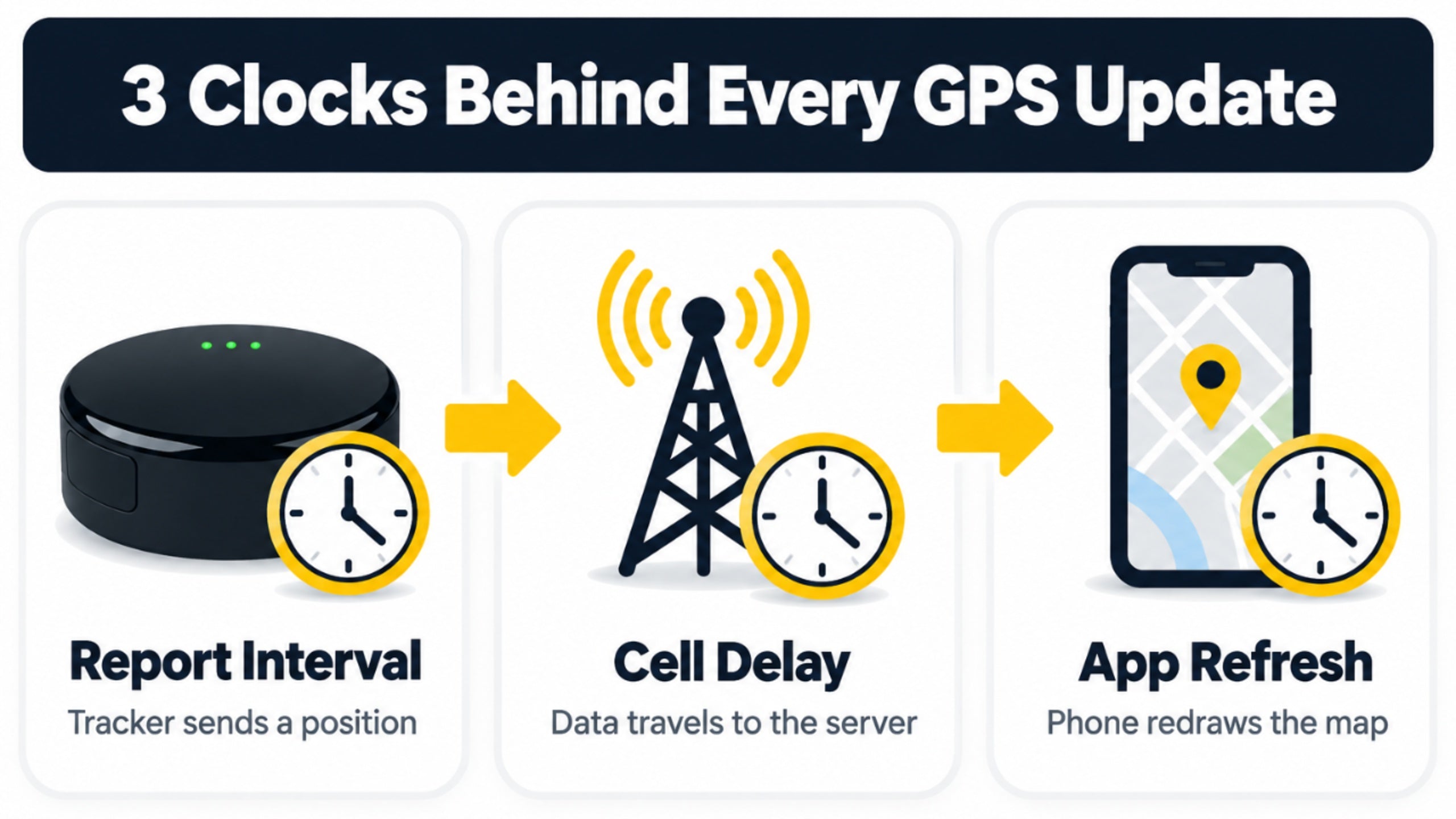
Three separate clocks run at once, and mixing them up causes most of the confusion.
Report Interval
Your tracker sends a position on this clock. Your data plan sets it, and it decides how fresh each dot on your map can be.
App Refresh
Your phone redraws the map on this clock. Faster screen refreshes cannot show a position the tracker has not sent yet.
Cell Delay
Data takes a short trip from the tracker to the server to your phone on this clock. Weak signal stretches it, which is one reason a dot can lag behind a trailer that is moving.
Time-Based vs. Motion-Based Updates
Time-based reporting sends a position on a fixed schedule. Motion-based reporting wakes the tracker when the trailer starts to move. Outlaw GPS connects when motion occurs, and once the trailer rolls, it reports at the interval your plan sets.
I like this design for trailers.
Trailers sit far more than they roll, so sitting still should cost nothing, and moving is when you want the battery working for you.
How Often Does a Trailer GPS Tracker Update When Parked?
Most trackers report a few times a day, or wait for motion, while the trailer sits parked, and that is fine: parked trailers rarely need updates every few seconds. Outlaw GPS connects when motion occurs, and Energy Saver mode limits it to scheduled check-ins.
Nobody wants a dead tracker in March. Below, you will see why parked trailers report less, and which setting protects you when a trailer sits where thieves can reach it.
Parked is where battery life is won or lost.
Why Parked Trailers Report Less
Every update wakes the GPS chip and the cellular modem. Do that every few seconds on a trailer that sits for three weeks, and the battery drains for no reason. Letting the tracker sleep until motion starts saves the charge for the moments that count.
Cold weather, weak signal and a steel box around the tracker all make the drain worse. Placement matters as much as the plan.
What Energy Saver Mode Changes
Energy Saver mode goes one step further: the tracker limits updates to scheduled check-ins only, and you must turn motion-based tracking back on from the Energy Saver menu.
The mode you pick can matter more than the interval you pay for. With motion-based tracking off, the tracker reports on its schedule instead of the moment the trailer moves, so a fast plan cannot help much while the tracker waits for its next check-in.
My advice is simple. Use Energy Saver for a trailer in winter storage, and turn motion-based tracking back on before you leave the trailer anywhere a thief can reach it.
Outlaw GPS Update Intervals, From 3 Minutes to 3 Seconds
Why would anyone pay for a faster interval? Because each of the six tiers changes how soon you see the trailer move, and the sections below cover what each tier fits, what it costs and how to switch.
Start with what each tier is built for.
The Six Interval Tiers
Outlaw GPS sells six update speeds, and the table shows what each one fits best.
| Update Interval | Best Fit | What You Get |
|---|---|---|
| 3 minutes | Stored or seasonal trailers | Occasional location checks at the lowest monthly cost |
| 1 minute | Most trailer owners | Accurate tracking without overspending |
| 30 seconds | Active job-site trailers | Tighter tracking for trailers that move often |
| 10 seconds | High-value equipment | Near real-time visibility |
| 5 seconds | Areas with active theft risk | Fast tracking where a theft would hurt most |
| 3 seconds | Maximum visibility | The fastest refresh Outlaw GPS offers |
Pick the slowest tier that still answers the question you care about.
What Faster Updates Cost
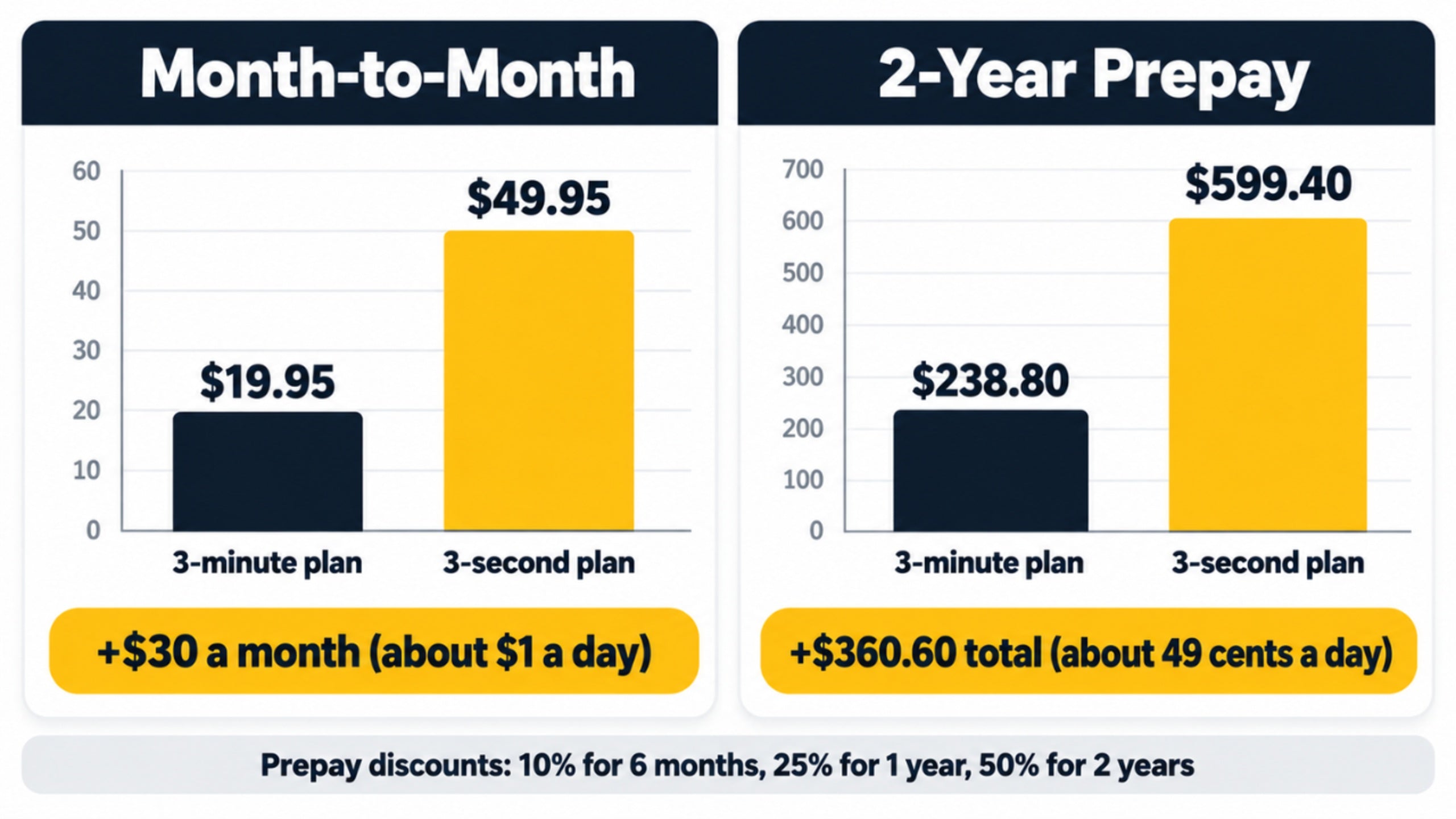
On month-to-month billing, the 3-minute plan runs $19.95 and the 3-second plan runs $49.95. The gap comes to $30 a month, or about $1 a day.
Prepay narrows it. Every tier gets a discount when you pay ahead:
- 10% off for 6 months
- 25% off for 1 year
- 50% off for 2 years
On a 2-year prepay, the 3-minute plan totals $238.80 and the 3-second plan totals $599.40. The difference is $360.60 over two years, which works out to about 49 cents a day.
You may have seen "$9.95 a month" on a real-time tracker page. The $9.95 price belongs to the 3-minute plan on a 2-year prepay. I would rather you know that now than feel surprised at checkout.
For the full six-tier price table, I break it down in my trailer GPS tracker features guide.
How to Change Your Interval
Your interval is tied to your plan, so changing the plan changes the interval. Sign in to the app or the web account, open Manage Devices, and choose Change Plan next to the tracker's serial number.
Upgrades charge the price difference, and downgrades credit it back. The next billing cycle shows the full price of the new plan.
Match the Plan to Your Trailer
Six update speeds, one magnetic tracker. Pick 3 minutes for a trailer in storage, or 3 seconds for the one you cannot afford to lose track of.

Compare Outlaw GPS Plans
How Far Can a Thief Get Between GPS Updates?
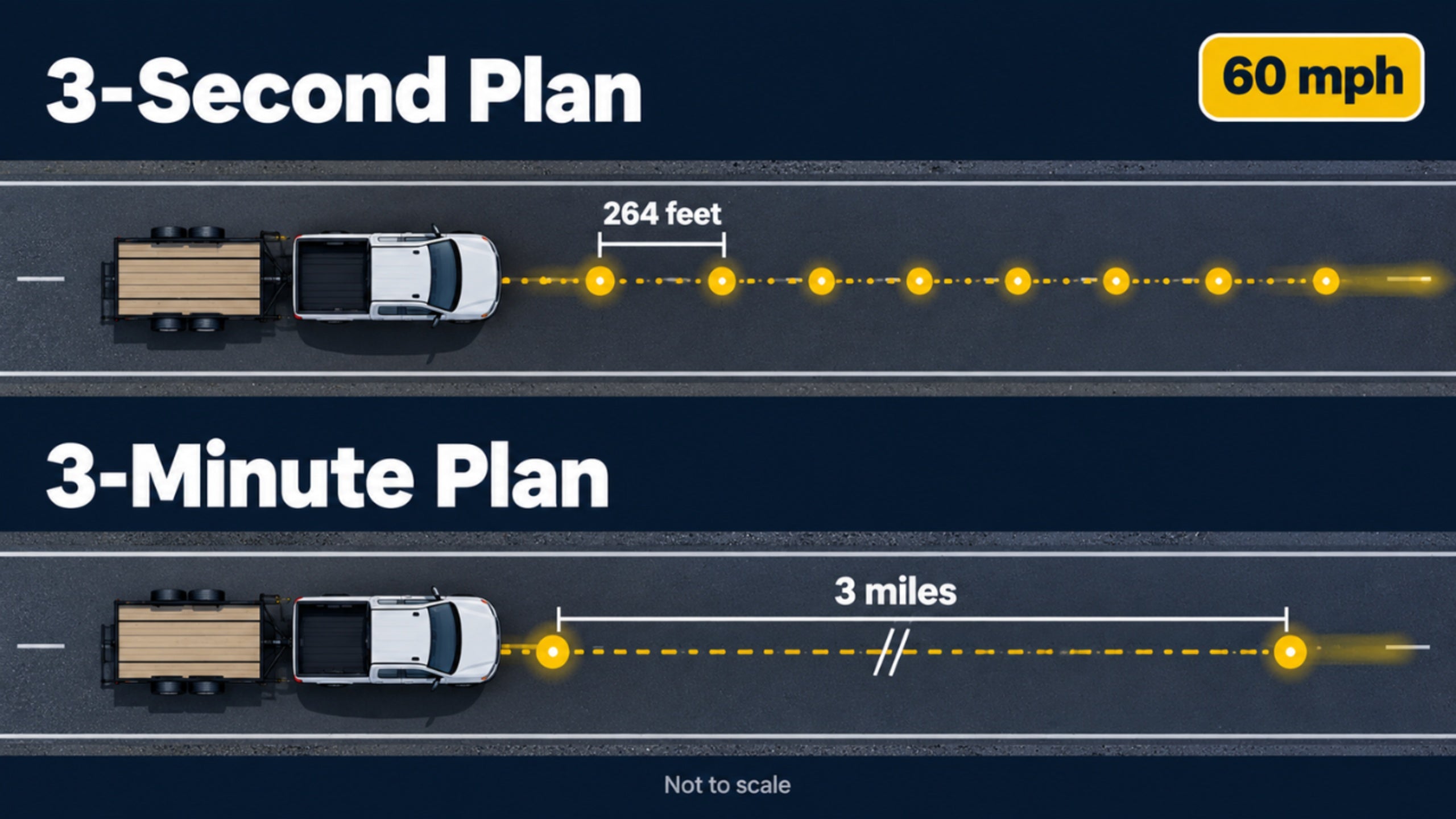
I'm Ryan Horban, and after 15 years in GPS tracking, I tell every trailer owner the same thing: your update interval decides how far a thief gets before you see it. Outlaw GPS reports as fast as every 3 seconds on its top plan, which puts a trailer rolling at 60 mph about 264 feet from its last dot. On a 3-minute plan, that same trailer can be 3 miles down the road.
The longer the gap between updates, the more road a trailer covers before you know anything. Below, you will find the distance for every plan, a step-by-step timeline, and the theft numbers that make the gap matter.
Seconds turn into miles fast.
Distance Between Updates at 60 MPH
Highway speed makes the math simple. At 60 mph, a trailer covers 88 feet every second. Multiply that by the update interval, and you get the stretch of road between two dots on your map.
Between updates on a 3-second plan at 60 mph, compared with 3 miles between updates on a 3-minute plan.
| Update Interval | Distance Between Updates at 60 MPH |
|---|---|
| 3 seconds | 264 feet |
| 5 seconds | 440 feet |
| 10 seconds | 880 feet |
| 30 seconds | 0.5 mile |
| 1 minute | 1 mile |
| 3 minutes | 3 miles |
Those numbers assume steady highway speed. Real trips slow down and speed up, but the pattern holds: slower intervals leave bigger blind spots.
What the Gap Looks Like in Minutes
The example below is an illustration, not a real case. Take a trailer hooked up at 2:40 a.m. and driven off at 60 mph, once on a 3-second plan and once on a 3-minute plan. Walk through it step by step:
- The thief pulls out of the lot and crosses your geofence boundary.
- On the 3-second plan, the first position outside the boundary reaches the app within seconds. On the 3-minute plan, the wait can run up to 3 minutes.
- The app checks that position against your boundary and flags the crossing, so your phone buzzes. By then the trailer sits a few hundred feet away on the 3-second plan, or up to 3 miles away on the 3-minute plan.
- You open the live location and call the police. One plan gives the officer a dot moving along a road. The other gives a dot that is already several turns behind.
- Ten minutes in, the trailer has traveled about 10 miles. The 3-second plan has sent about 200 updates. The 3-minute plan has sent about 3.
Same trailer, same road, same thief. Only the plan changed.
Pair a fast interval with geofence alerts for trailer security, because the app checks each new position against your boundary, and a crossing can only show up when a new position arrives.
Set Up Geofence Alerts →Why This Matters Right Now
According to Verisk CargoNet, which tracks cargo theft across the United States and Canada, confirmed cargo thefts rose 18% in 2025, from 2,243 to 2,646 incidents. Estimated losses reached nearly $725 million, up 60% from 2024, and the average loss per theft climbed 36% to $273,990.
Cargo theft covers more than trailers, but the numbers show how much is at stake when a tow-away goes unseen. Outlaw GPS is built for those first minutes, while the trailer is still close.
Outlaw GPS is built for those first minutes, while the trailer is still close. The 3-second plan puts 264 feet between updates.
See the 3-Second Plan →Does a Faster Update Rate Drain the Battery?
Yes. Each update wakes the GPS chip and the cellular modem, so faster intervals drain the battery sooner.
Battery life is the price of speed. Below, you will see what Outlaw GPS lists for standard and low power modes, what else shortens a charge, and when a hardwire kit changes the math.
Think of each update as a phone call your tracker makes: call every 3 seconds and the battery runs down fast, call every few minutes and it lasts for weeks.
What the Battery Does at Each Setting
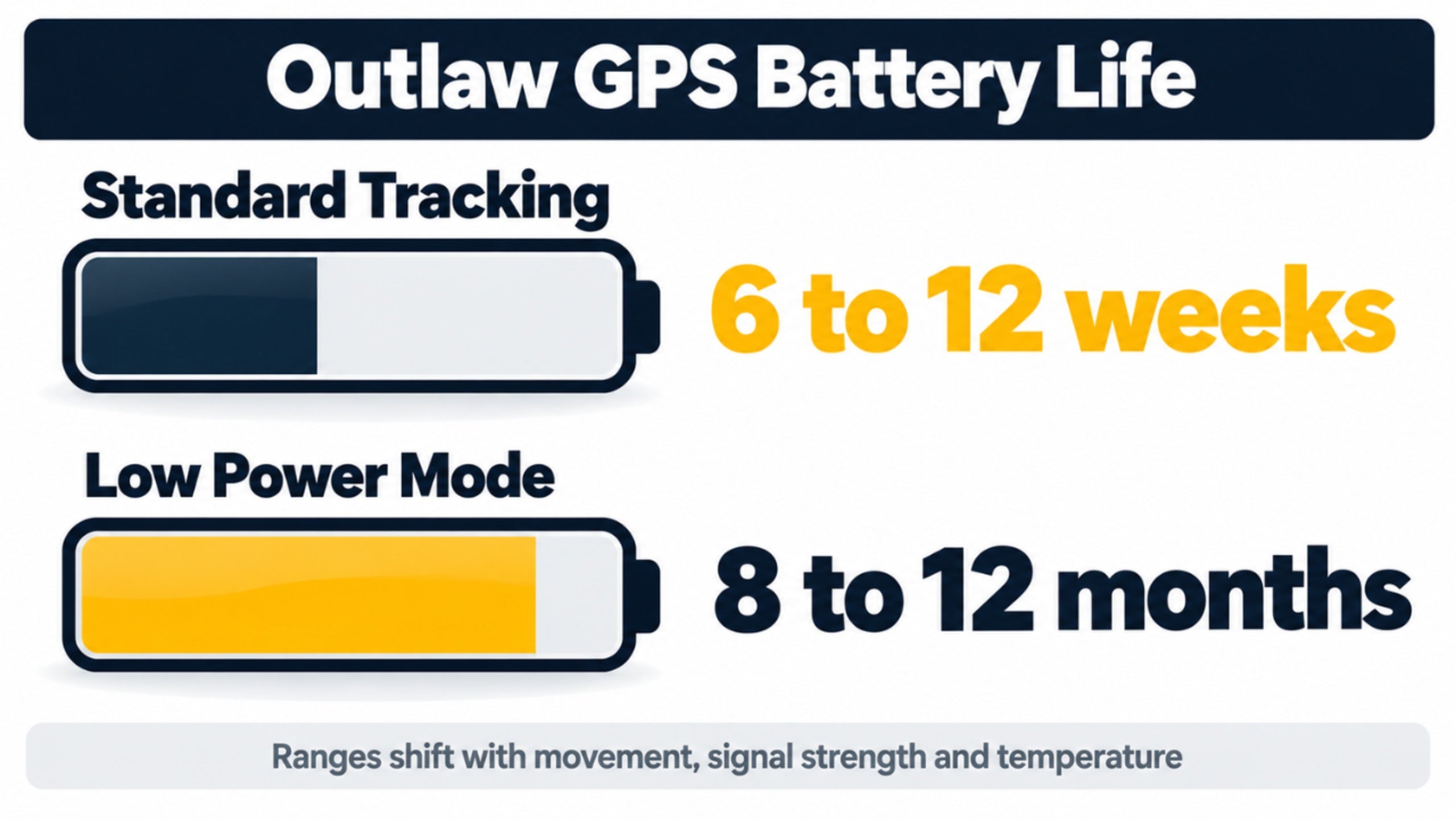
The Outlaw GPS tracker runs on a 4,240 mAh lithium-ion battery. The product page lists 6 to 12 weeks in standard tracking and 8 to 12 months in low power mode, and it says movement, signal strength and temperature move those numbers up or down.
Outlaw does not publish a battery figure for every interval, so I treat those numbers as ranges, and I expect the 3-second plan to land toward the short end.
Faster updates cost battery, and no tracker avoids that trade. Spend the speed where it protects you.
What Else Shortens Battery Life
Interval is the biggest lever, but five other things take their share:
- Weak cell signal, which makes the modem work harder to send each update
- Cold weather, which cuts the usable charge of lithium batteries
- Poor sky view, which keeps the GPS chip awake longer
- Frequent trips, since motion triggers reports
- Antenna-blocking mounts, such as a sealed metal box
Fix the ones you control, mainly placement, before you blame the plan. On cold weather, SLAC National Accelerator Laboratory, a U.S. Department of Energy lab at Stanford, says lithium-ion batteries are "a bit famous for their poor cold-weather performance", so expect shorter charges in winter.
When a Hardwire Kit Removes the Trade-Off
If the trailer has a 12-volt power source, a hardwire kit (sold separately) lets the tracker draw power from the trailer instead of relying only on its own battery, so battery matters much less.
Our guide to wired vs wireless trailer GPS trackers shows who should choose which.
Compare Wired vs Wireless →Why Isn't My Trailer GPS Tracker Updating?
Most update problems trace back to your plan interval, tracking mode, power or placement. Check them in that order.
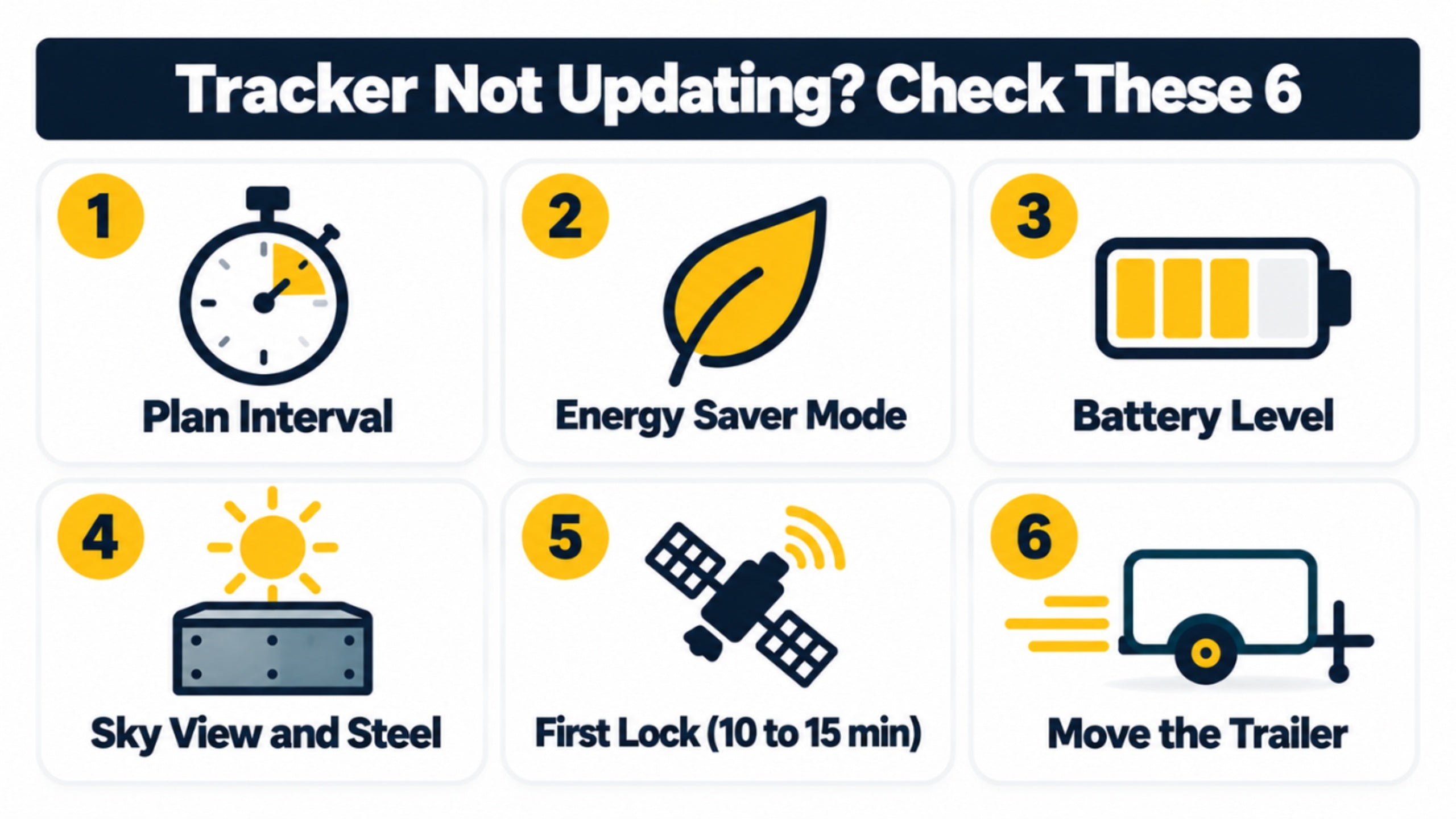
Work through the six steps below from easiest to hardest, since most fixes sit in the first two. They cover your plan and mode, power and placement, and the app and signal.
Start with the settings, since they take seconds to check.
Check Your Plan and Mode First
Step 1: Check Your Plan Interval
Plans set at 3 minutes look slow by design. If your dot moves in big jumps, open Manage Devices and confirm which plan the tracker is on.
Step 2: Check Energy Saver Mode
Energy Saver limits updates to scheduled check-ins. If the trailer moved and nothing showed up, turn motion-based tracking back on from the Energy Saver menu.
Check Power and Placement
Step 3: Check the Battery Level
Open the tracker's details in the app to see its battery level. Drained batteries stop location updates, and hardwired setups need a steady power connection.
Step 4: Check Sky View and Steel
Metal blocks signals, and open sky helps the tracker lock on. According to GPS.gov, the official U.S. government GPS site, real-world accuracy depends on factors such as atmospheric effects, sky blockage and receiver quality, which you can read on its GPS accuracy page. Avoid fully enclosed metal spaces when you can.
Check the App and Signal
Step 5: Allow for the First Lock
New trackers can take 10 to 15 minutes outdoors to complete the first satellite lock. Expect that delay once, on day one.
Step 6: Move the Trailer
Outlaw GPS does not support remote wake-up or reboot. Movement wakes the tracker, so roll the trailer a short distance, then check the app. If problems continue after movement, contact Outlaw GPS support.
I always tell owners to test after any change: move the trailer ten feet, then watch the map.
Which Update Rate Does Your Trailer Need?
Match the interval to how often the trailer moves and how much a late alert would cost you. Stored trailers do fine on 3 minutes, and trailers in theft-prone areas need 5 or 3 seconds.
Not every owner needs 3-second updates, and I would not sell them to someone who does not. Below, you will find five common setups and the plan that fits each.
Find your trailer in the list.
Match the Interval to the Trailer
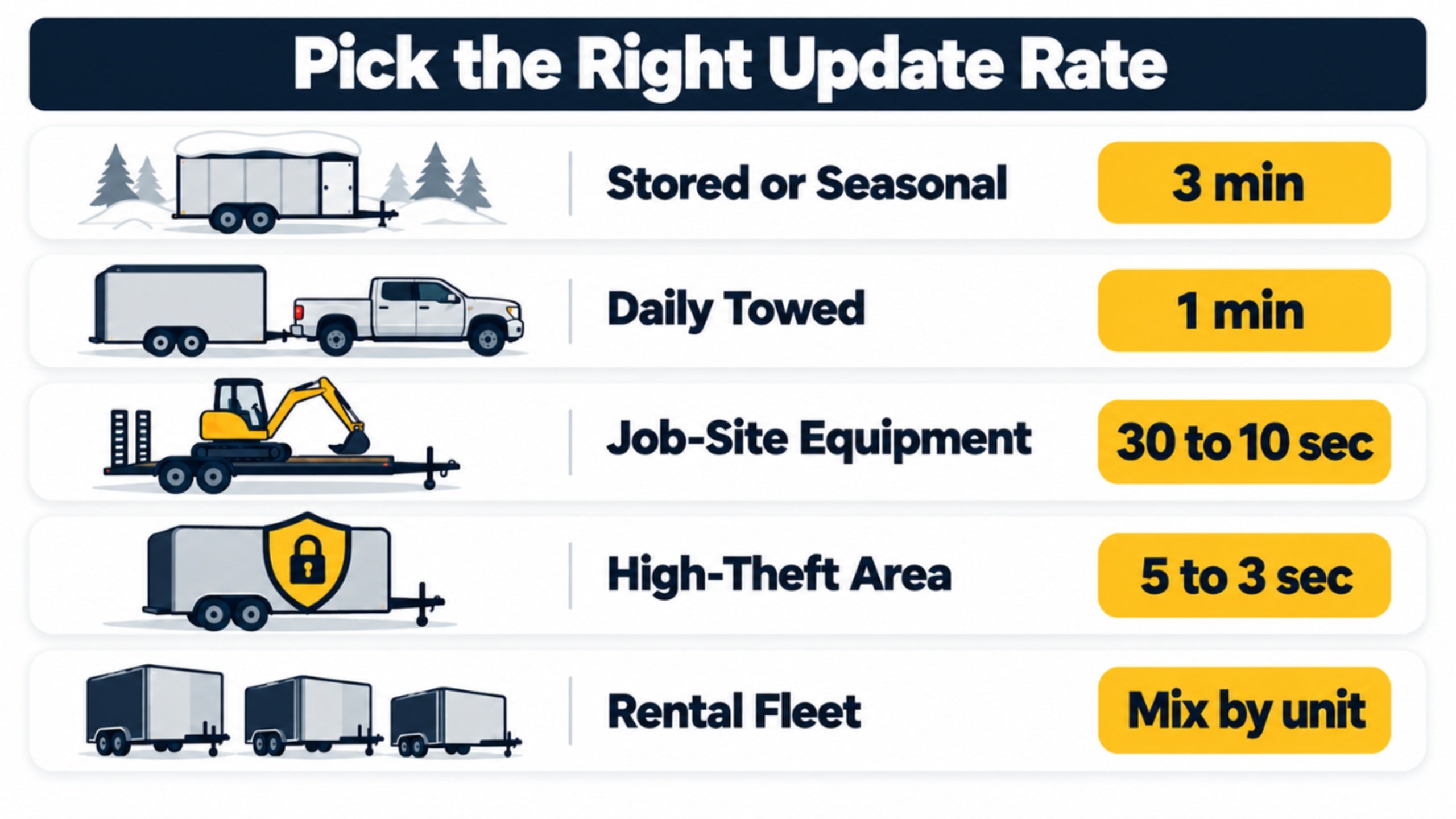
Five setups cover most owners, and the graphic shows the plan for each.
Stored or Seasonal Trailers
Go with the 3-minute plan, for two reasons:
- The trailer rarely moves, so most days there is nothing to report
- You keep the monthly cost as low as it goes
Check the app after any trip to confirm the tracker still reports.
Daily Towed Trailers
Choose the 1-minute plan. You get an accurate trail on every trip without overspending.
Job-Site Equipment Trailers
Choose 30 seconds, or 10 seconds when the load is worth real money. These trailers often sit alone overnight, so a tighter interval pays off.
Trailers in High-Theft Areas
Choose 5 seconds or 3 seconds. When a late alert means a cold trail, speed is the product you are buying. I would not pay for 3-second updates on a trailer that never leaves a locked yard, though.
Rental and Multi-Trailer Fleets
Mix plans by unit: slower for spares in the yard, faster for the ones out with customers. One account manages many trackers, and each tracker has its own plan. One look at the map answers four questions:
- Which units are back at the yard
- Which units are out with customers
- Which units are past their return window
- Whether any unit moved overnight
Spend the fast plans on the units that leave the yard.
If a monthly fee is the sticking point, read our guide to a trailer GPS tracker with no monthly fee before you decide. Real-time tracking runs on a cellular plan, so trackers without a monthly fee give up something, and that guide shows what.
See No-Fee Trade-Offs →Conclusion
The update interval is the one number that decides how much road a thief covers before you see anything. Plans, batteries and mounts all matter, but none of them changes the size of the gap between two dots on your map.
Outlaw GPS shrinks that gap to about 264 feet on its 3-second plan, on a magnetic tracker that runs on its own battery. Pick the plan that fits how your trailer lives, keep motion-based tracking on wherever a thief could reach the trailer, check the battery level once a month, and test the tracker after every change.
After 15 years in GPS tracking, I give owners the same advice about speed: buy only as much as you would regret not having. Choose once, set it up right, and the tracker does its job while you sleep, whether the plan is 3 minutes or 3 seconds.
Slow updates show you where your trailer was. Fast ones show you where it is.
See It Move Before It Gets Far
Next time someone hooks up your trailer, the fast plan shows you in seconds, not hours. Outlaw GPS reports as fast as every 3 seconds on its top plan.

Get Outlaw GPS Today
About the Author


